
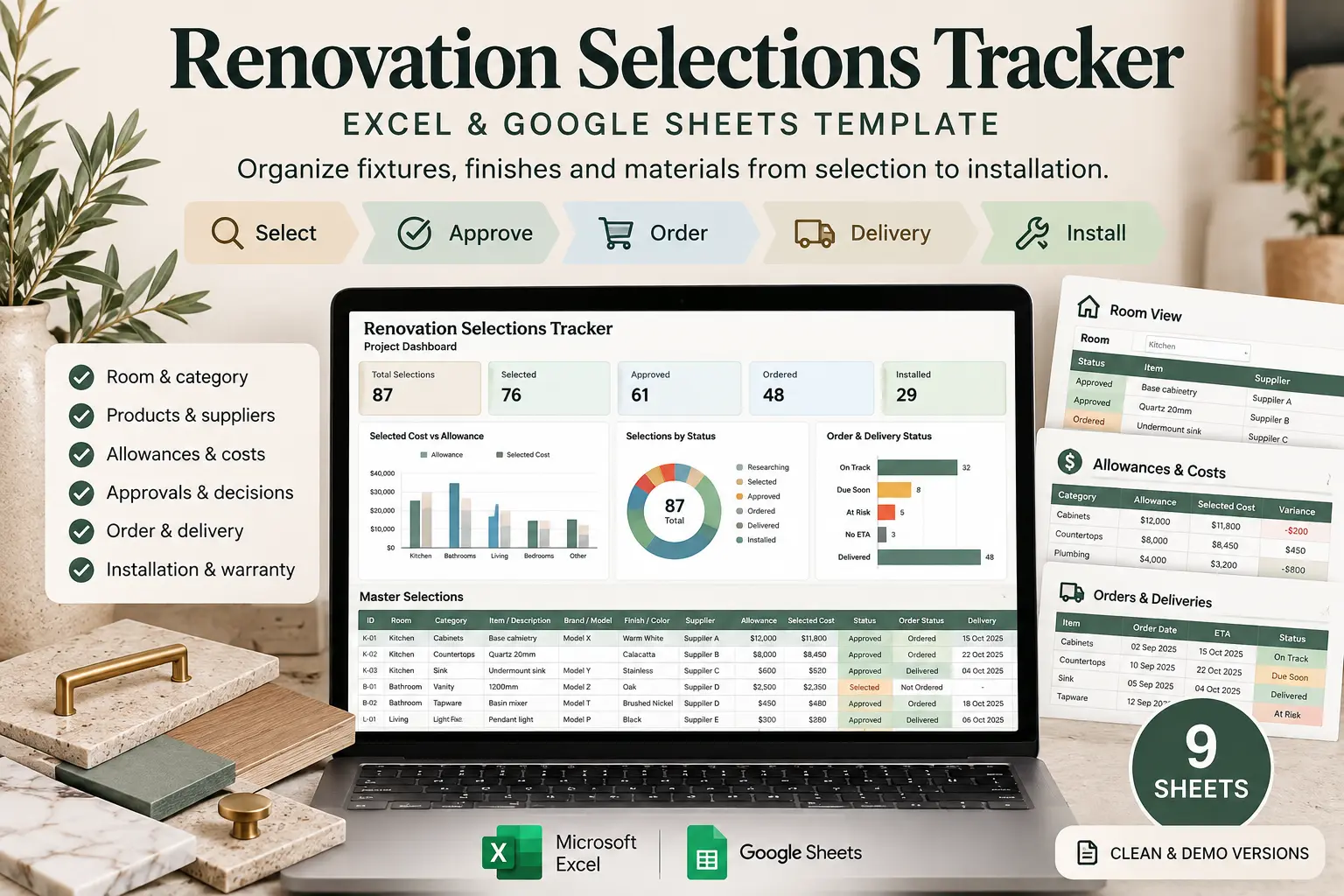
Renovation Selections Tracker for Excel & Google Sheets
Use one connected renovation selections tracker to organize fixtures, finishes and materials from the first shortlist through approval, allowance review, ordering, delivery and installation.
Best for: homeowners managing renovation product decisions across kitchens, bathrooms, whole-home remodels and other projects where dozens of specifications, suppliers, allowances and dates need to stay connected.
The Hard Part Is Knowing What Is Actually Ready
A renovation can contain dozens of choices that look finished until someone asks for the SKU, approved color, supplier, allowance, order status or delivery date. A renovation selections tracker gives those decisions a clear place to move from idea to installed item.
Selected
You know which product, finish or fixture you want.
Approved
The choice is confirmed and ready to move forward.
Ordered
The supplier, order date and expected delivery are known.
Installed
The selection has reached the end of the project workflow.
Enter the Selection Once, Then Use It Everywhere
The Master Selections sheet is the center of the renovation selections tracker. Instead of copying the same information into separate allowance, approval and delivery lists, you record the selection once and use connected views to review it from different angles.
This is more than a basic finish schedule template. It connects product information with cost, responsibility, decisions, procurement and closeout so you can see what still needs attention.
A Selection Can Carry Its Full Story
- Room and category
- Brand, model, SKU, color and finish
- Supplier and product links
- Allowance and selected cost
- Approval and decision dates
- Order, ETA and delivery status
- Installation and warranty notes
Keep the Details That Usually End Up Scattered Across Notes and Tabs
The renovation selections tracker is prepared for up to 250 selection rows, giving you room to manage the small specifications as well as the big-ticket choices.
Product Identity
Record brand, model, SKU, color, finish, size, quantity, supplier and useful product or specification links.
Money & Allowance
Keep allowance, unit price, shipping, fees, selected total and allowance variance attached to the selection itself.
Decision to Closeout
Follow purchasing responsibility, approval, order date, lead time, delivery risk, installation and warranty information.
Switch Between the Room and the Product Category
The renovation selections tracker creates useful views from the same master information, so you can check everything needed for one room or compare one category across the entire project.
What Is Happening in the Kitchen?
Select a room and review its choices, approvals, allowances, order status, expected delivery, delivery risk and installation status together.
Useful when you are preparing for a room-specific meeting, installation or site walkthrough.
Where Do All the Plumbing Fixtures Stand?
Select a category and compare relevant products across multiple rooms without rebuilding another list.
This gives the workbook some of the usefulness of a material selection spreadsheet without separating materials from approvals, allowances and procurement.
See the Cost Consequence of the Choice You Made
The renovation selections tracker compares applicable allowances with selected product costs and keeps missing information visible. Blank allowance fields are not automatically treated as zero, and selected items without pricing remain visibly unpriced.
That makes this useful as a focused renovation allowance tracker without trying to replace your complete project budget.
Within Allowance
The selected total is at or below the applicable allowance entered for that item.
Over Allowance
The variance stays visible so an upgrade does not disappear inside the rest of the selection list.
Unpriced
A choice without a usable selected cost stays identifiable instead of quietly becoming a misleading $0.
Know Which Selections Can Become Schedule Problems
The renovation selections tracker uses order information, supplier ETA, lead time, needed-by dates and actual delivery to keep procurement issues visible before they surprise the project.
Use it as an order and delivery tracker for the products already connected to your renovation choices.
ON TRACK
Expected timing does not currently show a delivery conflict.
DUE SOON
An upcoming expected delivery deserves your attention.
AT RISK
The expected delivery falls after the date the item is needed.
NO ETA
An ordered selection still has no useful expected delivery date.
Turn a Long Selection List Into a Project Overview
The renovation selections tracker dashboard brings the most useful project signals together so you can stop searching through individual rows every time you want to know what is behind.
- Total selections and selections chosen
- Selections approved and still awaiting approval
- Total applicable selection allowance
- Current selected cost and allowance variance
- Not-yet-ordered selections
- Delivery issues needing attention
Four Useful Dashboard Views
Allowance vs Selected Cost
See how current selected costs compare with allowances by category.
Selections by Status
See how much of the project is still researching, selected, approved, ordered or complete.
Order & Delivery Status
Review the procurement pipeline without opening every selection row.
Progress by Room
See where selection work is moving and where decisions are still incomplete.
Inside the Workbook
The renovation selections tracker uses one main data source and eight supporting views, summaries and setup areas so the workbook feels connected rather than like a stack of unrelated worksheets.
Start Here
Understand the six-step workflow, input colors and basic workbook rules.
Project Setup
Set project dates, currency, rooms, categories and total selection allowance.
Master Selections
Maintain the central database for up to 250 fixtures, finishes and materials.
Room View
Choose a room and automatically review the selections connected to that area.
Category View
Choose a category and compare relevant selections across rooms.
Allowances & Costs
Review selected costs, allowances, variances, overages and unpriced choices.
Orders & Deliveries
See procurement status, lead time, expected delivery and delivery risk.
Approvals & Decisions
Find pending approvals, unresolved choices and overdue decision dates.
Dashboard
Review progress, cost, approvals and procurement issues in one overview.
Renovation Selections Tracker: How It Works
Start with the project structure, then move every important choice through the stages that matter. You do not need to build separate lists for every step.
01 · Set Up the Project
Add dates, currency, rooms, categories and your overall selection allowance.
02 · Build the Selection List
Add the fixtures, finishes and materials your renovation needs.
03 · Make & Approve Choices
Record product details, pricing, due dates and approval status.
04 · Check the Allowance
See whether priced selections are within, over or missing an applicable allowance.
05 · Order & Track Delivery
Record who buys it, order dates, lead time, ETA and delivery risk.
06 · Install & Close Out
Record installation status, responsibility, warranty information and final notes.
Start Blank or Learn From a Completed Example
Your purchase includes the renovation selections tracker in both clean and demo formats so you can explore a realistic example before setting up your own project.
- Clean Microsoft Excel workbook
- Completed demo Excel workbook
- Clean Google Sheets copy
- Completed demo Google Sheets copy
- Google Sheets Access PDF
- Quick Start Guide PDF
Excel + Google Sheets
No macros or VBA.
The workbook is designed around standard spreadsheet formulas, validation and connected views.
Prepared for real projects.
Use up to 250 selection rows, approximately 30 editable rooms or areas and approximately 40 editable categories.
Flexible workflow.
Use it alongside an Excel renovation planner or a Google Sheets renovation planner without forcing your whole renovation budget into this workbook.
Common Questions
Who is this renovation selections tracker for?
This renovation selections tracker is designed primarily for homeowners managing product, material and finish choices during a renovation or remodel. It can also be useful for owner-builders, designers or project managers who need one organized selection record.
What kinds of selections can I track?
You can track flooring, tile, grout, paint, cabinetry, countertops, plumbing fixtures, lighting, hardware, appliances, doors, trim, glass, mirrors, accessories and other project-specific fixtures and finishes.
Does the workbook replace my renovation budget?
No. It tracks costs and allowances at the individual selection level. Use the Renovation Budget & Cost Tracker when you need complete project budgeting, payments, change orders and forecast final cost.
What happens when a product price is missing?
A selected item without enough pricing information can remain visibly unpriced rather than being silently counted as zero. This helps separate incomplete information from an actual zero-dollar cost.
Can I customize rooms and categories?
Yes. The setup includes editable room and category lists so the workbook can reflect your project rather than forcing every renovation into the same structure.
Does it track delivery risk automatically?
The workbook uses the order information and dates you enter to identify useful planning statuses such as on track, due soon, late, at risk, delivered, not ordered or no ETA. Supplier information should always be confirmed directly.
Does it work in Google Sheets?
Yes. The purchase includes Google Sheets access for clean and completed demo versions as well as the Microsoft Excel files. Minor formatting differences can occur between spreadsheet platforms.
Know What Was Chosen, What It Costs and What Happens Next
Use the renovation selections tracker to keep product specifications, allowances, approvals, purchasing, delivery and installation connected from the first decision through project closeout.