
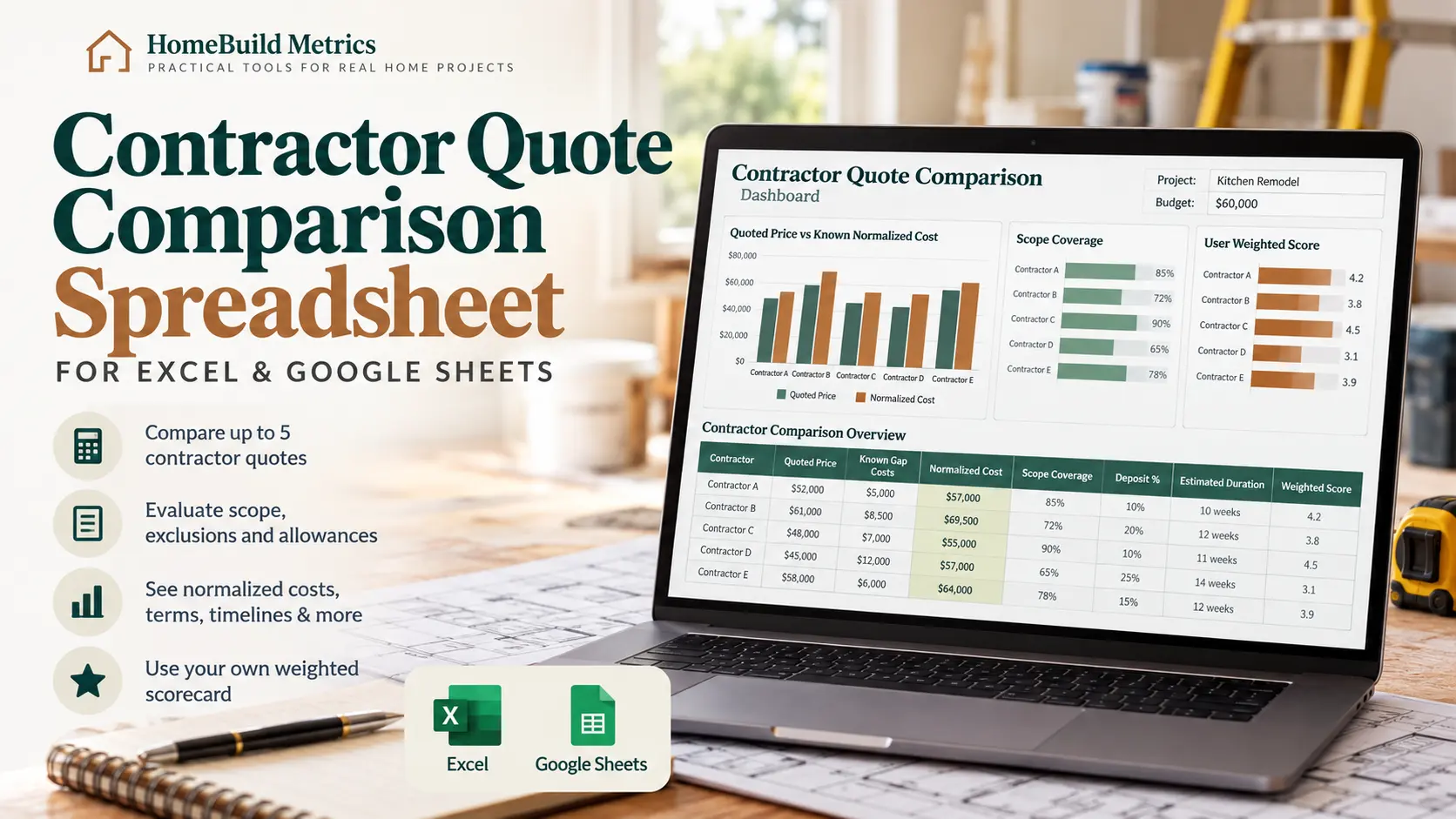
Contractor Quote Comparison Spreadsheet for Excel & Google Sheets
Compare up to five contractor quotes by price, scope coverage, exclusions, allowances, known scope gaps, terms, timelines and your own weighted evaluation before you decide who to hire.
Best for: homeowners comparing renovation, remodeling or home-improvement contractors whose proposals do not cover exactly the same work.
A Lower Contractor Quote May Cover Less Work
Two proposals can show different prices because they do not always include the same scope. One contractor may include permits, cleanup or finishing work while another leaves those costs outside the quoted contract price.
Quoted Price
The headline amount shown in the contractor proposal.
Known Scope Gaps
Work that is excluded, partially covered, not mentioned or still needs clarification.
Known Normalized Cost
Quoted price plus valid scope-gap estimates that you enter.
Compare the Quote They Gave You With the Scope They Did Not
Quoted Contract Price + User-Estimated Scope Gap Costs = Known Normalized Comparison Cost
The spreadsheet does not invent prices for missing work. Add a gap estimate only when you have a reasonable basis for one. If the cost is still unknown, leave it blank and the workbook keeps the gap visibly unpriced.
See What Each Contractor Actually Includes
Use the same project scope checklist for each bidder, then classify how completely every proposal covers the work.
Included
Fully covered in the contractor proposal.
Allowance
Included using a stated allowance amount.
Partial
Only part of the scope is clearly covered.
Excluded
The proposal specifically leaves this work outside the quote.
Not Mentioned
The proposal does not clearly address the scope item.
Clarification Needed
More information is needed before treating the item as covered.
Keep Allowances and Unpriced Gaps Visible
A comparison can look complete even when important costs are still unknown. This workbook keeps those uncertainties visible instead of burying them inside a zero.
Priced Gap
When you enter a reasonable estimate for missing work, that amount contributes to the known normalized comparison cost.
Unpriced Gap
When the cost is still unknown, the workbook flags the gap instead of automatically counting it as $0.
Allowance
Allowance amounts are tracked separately so an amount already inside the quote is not automatically added again.
Review the Main Contractor Differences at a Glance
The dashboard brings together the major comparison signals so you can review the proposals without jumping between separate notes and spreadsheets.
- Project budget
- Lowest quoted price
- Lowest known normalized cost
- Average contractor quote
- Unpriced scope gaps
- Scope coverage percentage
- Deposit percentage
- Estimated duration
- User-weighted score
Three Focused Comparison Charts
Quoted Price vs Known Normalized Cost
See how known scope-gap estimates change the financial comparison.
Scope Coverage
Compare how completely each proposal covers the applicable scope you entered.
User Weighted Score
Compare the scores produced from your own criteria, weights and 1–5 evaluations.
The workbook supports your decision. It does not automatically label any contractor as the best choice.
Compare Contractor Terms and Timelines Side by Side
Price and scope matter, but deposits, scheduling, responsibilities and verification checks can also change how a proposal fits your project.
Deposits
Compare required deposit amount and percentage.
Timeline
Record estimated start date, calendar-day duration and estimated completion.
Responsibilities
Compare permits, cleanup, materials and other project responsibilities.
Verification
Record licensing, insurance and reference checks.
Create Your Own Weighted Contractor Scorecard
Price is only one part of a contractor decision. Set editable weights and enter 1–5 scores for the factors that matter most to your project.
You remain in control: the workbook does not invent subjective scores or automatically choose a contractor for you.
Editable Criteria
- Scope completeness
- Price / value
- Communication
- Proposal clarity
- Timeline confidence
- Relevant experience
- References
- Warranty
- Payment terms
- Professionalism
Nine Connected Contractor Comparison Worksheets
Each worksheet handles a different part of the comparison while keeping the important project and contractor information connected.
Start Here
Learn the six-step workflow and workbook input colors.
Project Setup
Set budget, contingency, dates, currency and decision status.
Contractors
Store up to five contractor quotes and key proposal details.
Scope Comparison
Compare what each contractor includes, excludes or leaves unclear.
Cost Comparison
Compare quoted prices, known scope-gap costs and normalized costs.
Terms & Timeline
Review deposits, dates, responsibilities and verification details.
Scorecard
Use editable weights and your own 1–5 contractor scores.
Dashboard
See the main comparison metrics and charts together.
Decision Summary
Record the contractor you select and the final negotiated terms.
How the Contractor Quote Comparison Spreadsheet Works
You do not need advanced Excel skills. Work through the comparison in order and let the connected calculations organize the results.
01 · Set Up Project
Enter the project budget, dates and basic comparison settings.
02 · Add Contractors
Enter up to five contractor quotes and proposal details.
03 · Compare Scope
Mark what each contractor includes, excludes or leaves unclear.
04 · Normalize Known Costs
Add reasonable estimates for known missing scope when you have them.
05 · Review Terms & Score
Compare commercial terms and evaluate the factors important to you.
06 · Record Your Decision
Save your selected contractor and final negotiated details.
Excel + Google Sheets Versions Included
Your purchase includes both blank and completed examples so you can explore the workflow before building your own comparison.
- Clean Microsoft Excel workbook
- Completed demo Excel workbook
- Clean Google Sheets copy
- Completed demo Google Sheets copy
- Quick Start Guide PDF
- Google Sheets Access PDF
- Personal-use license
- Version changelog
Built for Practical Use
No macros or VBA.
The workbook uses standard spreadsheet formulas and validation rather than requiring add-ons or code.
Completed demo included.
Use the fictional example to understand the workflow before entering your own contractor information.
Currency is a display setting.
The workbook does not perform live foreign-exchange conversion.
Renovation Budget & Cost Tracker
Track committed costs, payments, approved change orders, contingency and forecast final cost once the renovation moves forward.
Browse HomeBuild Metrics Resources
Explore practical planning spreadsheets, trackers and other resources built for real home projects.
Contractor Quote Comparison Spreadsheet FAQs
What is a contractor quote comparison spreadsheet?
A contractor quote comparison spreadsheet organizes multiple contractor proposals in one place so you can compare price, scope, exclusions, allowances, deposits, timelines, responsibilities and other decision factors.
How many contractors can I compare?
The workbook supports up to five contractors and up to 150 scope-comparison entries.
What is a known normalized comparison cost?
It is the contractor’s quoted contract price plus valid scope-gap cost estimates that you enter. It helps create a more consistent comparison when proposals do not include exactly the same work.
What if I do not know the cost of an exclusion?
Leave the gap estimate blank. The workbook flags it as an unpriced scope gap instead of automatically treating the unknown cost as zero.
Does the spreadsheet choose the best contractor for me?
No. The workbook organizes comparison information and lets you create your own weighted evaluation. You make the final contractor decision.
Does it work in Google Sheets?
Yes. The product includes Microsoft Excel workbooks plus Google Sheets copies of both the clean workbook and completed demo.
Does it verify contractor licenses or insurance?
No. You can record whether those checks have been completed, but the workbook does not independently verify licensing, insurance, references, workmanship or other contractor qualifications.
See the Differences Between Contractor Quotes More Clearly
Bring quoted prices, scope coverage, allowances, known gaps, terms, timelines and your own contractor evaluation together in one comparison spreadsheet for Excel and Google Sheets.